
This page is a wiki. Please login or create an account to begin editing.
Architecture: PPC
GoMac 2.1.1


| Rating: | |
| Category: | |
| Year released: | |
| Author: |
Power On Software |
| Publisher: |
Power On Software |
Download gomac_2.1.1.hqx_.hqx
(972.67 KB)
For System 7.0 - 7.6 - Mac OS 9
For System 7.0 - 7.6 - Mac OS 9
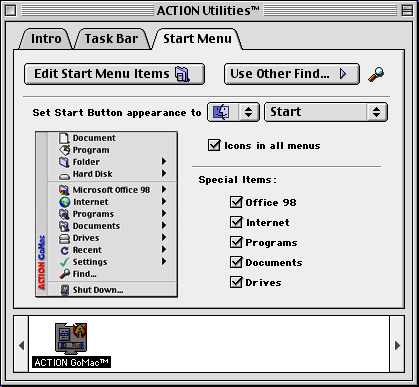
Action GoMac 2.1.1 gives a Mac user a Windows-like Taskbar at the bottom of a Mac's Desktop Screen.
Bugfixes:
- Version 2.1.1 fixes a problem that would cause the control panel to unexpectedly quit when switching between items in the control panel.
Version 2.1 adds the following:
- Added support for Microsoft Office 2001
- Added the ability to show an original file directly from any QuickLaunch item in the Task Bar
- Enhanced the ability to find Applications and Documents folders under Mac OS 9.x
- Added the ability to show an original file directly from any active application
- Added an option to automatically add active applications to the Start Menu
- Added compatibility with Apple DVD Player and iMovie
- Added the ability to pre-cache icons when GoMac is hidden at boot time, leading to substantial speed improvements
- Added checking to ensure that GoMac will not load under Mac OS X Classic environment
Source: http://gomac.mac.findmysoft.com/
Serial number: C210N9092161220141
CompatibilityArchitecture: PPC
Mac OS 7.5.3 - Mac OS 9.2.2.
Comments
Here's another place you can get Action GoMac from:
http://download.cnet.com/Action-GoMac/3000-2072_4-10006589.html
Aha now the screenshots are there. Very nice shots, too.
Thanks for locating this version. It works the best on Mac OS 9.x.
Strange, I typed serial in SheepShaver without Ctrl+V and it accepted it.
I've found with Sheepshaver, sometimes it will not accept pasted-in serial numbers. Not always, but sometimes - and then, what normally should be upper-case, you need to use lower-case. If you can't do a normal cut-n-paste 1st up, then you need to try typing in by hand, and if it still doesn't accept, try changing the upper-lower case parts. It "may" then work.
It appears that you tried to get in a few screenshots with the upload too, but they also didn't take?