
This page is a wiki. Please login or create an account to begin editing.
Architecture: PPC (Carbonized)
Canon PIXMA MP760 drivers CD-ROMs


| Rating: | |
| Category: | |
| Year released: | |
| Author: |
|
| Publisher: |
Canon |
Download CanonMP760_Mac.toast_.zip
(447.90 MB)
Download CanonMP760_PC.iso_.zip
(374.93 MB)
Emulation
Guides on emulating older applications
Guides on emulating older applications
Drivers CD-ROMs for the Canon Pixma MP760 printer/scanner hardware:
Canon.de/Printers/Inkjet/Pixma MP760 (Archiv)
Software included on CD-ROM:
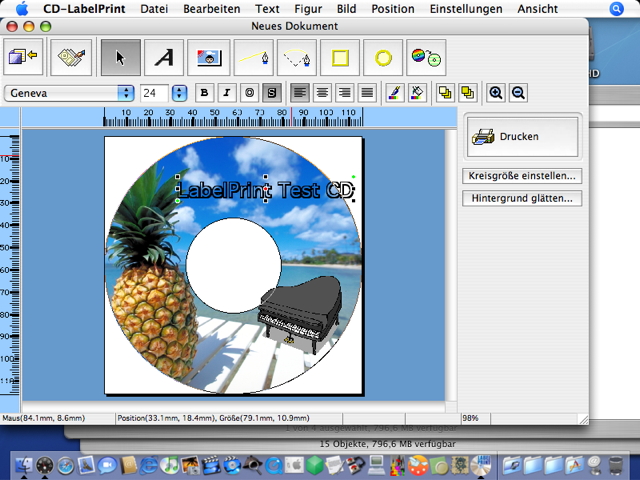
- CD Labelprint (design your CD labels)
- Easy PhotoPrint ("print your photos immediately")
- Scansoft Omnipage SE (OCR software)
- Arcsoft PhotoStudio ("import images from a scanner or digital camera then apply special effects and combine images in various ways")
Mac OS 9 hints:
Omnipage and Easy PhotoPrint are also Mac OS 9 compatible, with CarbonLib installed.
To run OmniPage on Mac OS 9, do this:
Once installed using Mac OS X, open the Components folder of its Application package to find a versions that runs. The "Get Information" dialog of Mac OS X offers the ability to run this application in the Classic Environment.
This comes with two separate multi-lingual CD-ROMs for Windows and Mac, available here:
'Canon Pixma MP760' Mac CD image
CanonMP760_Mac.toast.zip (447.9 MB)
For Mac OS X 10.2.4 and newer (PowerPC)
CompatibilityCanonMP760_Mac.toast.zip (447.9 MB)
For Mac OS X 10.2.4 and newer (PowerPC)
Architecture: PPC (Carbonized)
Hardware requirements Mac:
PowerPC, Mac OS X 10.2.4 or later.
Software requirements Mac:
Omnipage SE requires Mac OS 9.1 or newer,
Easy Photoprint runs on Mac OS 9.0 as well.
Hardware requirements PC:
Pentium 233 MHz, Windows 98/ME/2k/XP
Common requirements:
800 x 600 pixels minimum