
This page is a wiki. Please login or create an account to begin editing.
Architecture: PPC PPC (Carbonized)
Mac OS X for PPC (Mac OS 10)


| Rating: | |
| Category: | |
| Year released: | |
| Author: |
Apple |
| Publisher: |
Apple |
Download Mac_OS_X_Public_Beta_CD.dmg_.zip
(390.03 MB)
For Mac OS 9 - Mac OS X
For Mac OS 9 - Mac OS X
Download Mac_OS_X_Cheetah_CD.dmg_.zip
(433.46 MB)
For Mac OS 9 - Mac OS X
For Mac OS 9 - Mac OS X
Download MacOS_10_0_3.toast_.sit
(429.25 MB)
For Mac OS 9 - Mac OS X
For Mac OS 9 - Mac OS X
Download Combo10_0_4.dmg_.zip
(19.13 MB)
For Mac OS 9 - Mac OS X
For Mac OS 9 - Mac OS X
Download MacOS_10_1.toast_.sit
(476.89 MB)
For Mac OS 9 - Mac OS X
For Mac OS 9 - Mac OS X
Download Mac_OSX_10_1_3.toast_.sit
(502.28 MB)
For Mac OS 9 - Mac OS X
For Mac OS 9 - Mac OS X
Download Combo10.1.5.dmg_.zip
(44.55 MB)
For Mac OS 9 - Mac OS X
For Mac OS 9 - Mac OS X
Download iPhoto1.toast_.sit
(11.11 MB)
For Mac OS 9 - Mac OS X
For Mac OS 9 - Mac OS X
Download iMovie2.toast_.sit
(166.08 MB)
For Mac OS 9 - Mac OS X
For Mac OS 9 - Mac OS X
Download iTunes3.toast_.zip
(119.60 MB)
For Mac OS 9 - Mac OS X
For Mac OS 9 - Mac OS X
Download DTools_10_1.toast_.sit
(180.58 MB)
For Mac OS 9 - Mac OS X
For Mac OS 9 - Mac OS X
Download Jaguar_CD1.toast_.sit
(450.12 MB)
For Mac OS 9 - Mac OS X
For Mac OS 9 - Mac OS X
Download Jaguar_CD2.toast_.sit
(325.29 MB)
For Mac OS 9 - Mac OS X
For Mac OS 9 - Mac OS X
Download Jaguar_Update.toast_.sit
(109.23 MB)
For Mac OS 9 - Mac OS X
For Mac OS 9 - Mac OS X
Download Combo10_2_8.dmg_.zip
(96.40 MB)
For Mac OS 9 - Mac OS X
For Mac OS 9 - Mac OS X
Download DTools_10_2.toast_.sit
(278.14 MB)
For Mac OS 9 - Mac OS X
For Mac OS 9 - Mac OS X
Download Panther_CD1.toast_.zip
(483.15 MB)
For Mac OS 9 - Mac OS X
For Mac OS 9 - Mac OS X
Download Panther_CD2.toast_.zip
(590.44 MB)
For Mac OS 9 - Mac OS X
For Mac OS 9 - Mac OS X
Download Panther_CD3.toast_.zip
(192.61 MB)
For Mac OS 9 - Mac OS X
For Mac OS 9 - Mac OS X
Download MacOSXUpdateCombo10.3.8.dmg
(99.25 MB)
For Mac OS 9 - Mac OS X
For Mac OS 9 - Mac OS X
Download Panther_Xcode_Tools.toast_.zip
(580.15 MB)
For Mac OS 9 - Mac OS X
For Mac OS 9 - Mac OS X
Download Jaguar_Panther_Updates.toast_.zip
(627.45 MB)
For Mac OS 9 - Mac OS X
For Mac OS 9 - Mac OS X
Download Tiger_CD1.toast_.zip
(433.84 MB)
For Mac OS 9 - Mac OS X
For Mac OS 9 - Mac OS X
Download Tiger_CD2.toast_.zip
(575.86 MB)
For Mac OS 9 - Mac OS X
For Mac OS 9 - Mac OS X
Download Tiger_CD3.toast_.zip
(585.43 MB)
For Mac OS 9 - Mac OS X
For Mac OS 9 - Mac OS X
Download Tiger_CD4.toast_.zip
(171.70 MB)
For Mac OS 9 - Mac OS X
For Mac OS 9 - Mac OS X
Download Tiger_Updates.dmg_.zip
(745.04 MB)
For Mac OS 9 - Mac OS X
For Mac OS 9 - Mac OS X
Emulation
Guides on emulating older applications
Guides on emulating older applications
Mac OSX Public Beta
System clock must be set before May 2001.
Mac OSX Cheetah 10.0
10.0? Installer
10.0.3 Installer
10.0.4 Updater
Mac OSX Puma 10.1
10.1 Installer
10.1.3 Installer
10.1.5 Updater
iPhoto 1
iMovie 2
iTunes 3 - iMovie 3 - iPhoto 2 Requires Mac OS 10.1.5
Developer's Tools for 10.1
Mac OSX Jaguar 10.2
CD 1
CD 2
10.2.3 Updater CD
10.2.8 Combo Updater
Developer's Tools for 10.2
Mac OSX Panther 10.3
CD 1
CD 2
CD 3
10.3.8 Combo Updater
Panther Xcode Tools
Jaguar and Panther complete updates (Combo 10.3.9, Java...)
Mac OSX Tiger 10.4
CD 1
CD 2
CD 3
CD 4
Complete Tiger Updates (10.4.11 Combo, Java, Safari, Quicktime)
Leopard requires a dual layer DVD.
Unless you can find a DVR-R DL blank you'll probably need to use a +R blank and boot from an external firewire drive that supports DL +R disks.
At least that has been my experience with older machines.
Mac OS 10.5.8 Update
Leopard_10_5_8_Up.dmg.zip
Download from Mega
Leopard_10_5_8_Up.dmg.zip
Download from Mega
History:
http://en.wikipedia.org/wiki/Mac_os_x#Versions
see also:
Mac OS X for Intel microprocessor
Architecture: PPC PPC (Carbonized)
Comments
The Panther set worked perfectly for me.
The Tiger disks are great--burned and booted just fine.
The Panther ones though--not recognized by any of my 11 PPC machines on Option boot and cannot be set as a startup disk. Disc 1 in particular, as 2 and 3 are dependent on Disc 1. I have burned it in both Intel and PPC machines, and no difference.
"iTunes3.toast_.zip" -> This disc does not want to install on my PowerMac G4. It basically says I have a SuperDrive and therefore I should use "the other disc", which includes support for SuperDrive (iDVD maybe)? Does anyone have this "other disc" (complete iLife) ?
Tiger update zip works fine now...... NICE Thanks
I archived the Tiger Updates as a .dmg and then zipped that.
It successfully downloads, unzips and mounts.
sfp1954 : "The original file decompresses correctly - but once uploaded and downloaded it fails to decompress."
Learn to use cksum, a Unix (well, POSIX anyway) standard. I checksum everything I upload (clickkmi example).
It's OK for testing purposes.
Why are you using WinRAR when OSX has built in zip compression/decompression?
Not sure what's happening. The original file decompresses correctly - but once uploaded and downloaded it fails to decompress.
WinRAR Log:
Tiger_Updates\A_ONE\Java131and142Release2.pkg\Contents\Archive.pax.gz. The file is corrupt
Tiger_Updates\A_ONE\MacOSXUpdCombo10.4.11PPC.pkg\Contents\Archive.pax.gz. The file is corrupt
Tiger_Updates\C_THREE\JavaForMacOSX10.4Release5.pkg\Contents\Archive.pax.gz. The file is corrupt
Tiger_Updates\C_THREE\Safari4.1.3Tiger.pkg\Contents\Archive.pax.gz. The file is corrupt
Tiger_Updates\D_FOUR\JavaForMacOSX10.4Release7.pkg\Contents\Archive.pax.gz. The file is corrupt
Tiger_Updates\D_FOUR\JavaForMacOSX10.4Release9.pkg\Contents\Archive.pax.gz. The file is corrupt
Try it now.
Tiger update zip seems to be corrupt.
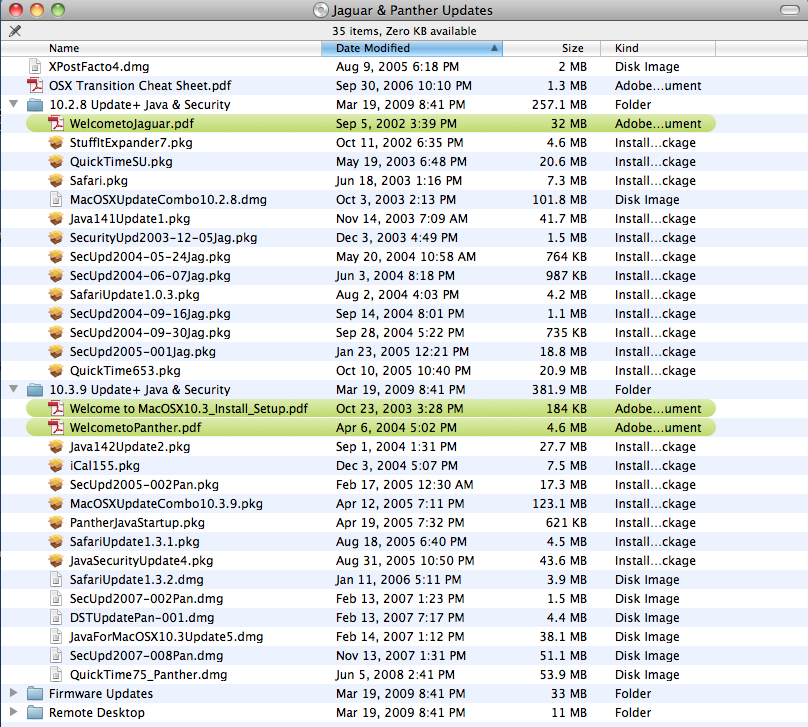
It appears Apple Software Update no longer works with Panther.
So I have added a disk with (hopefully) all the Jaguar and Panther Updates.
See the last image for a listing of the disk contents.
Good point.
If you guys continue like this we will have a warez Problem!
Even if that was possible it would still be a DVD size install. So it would far exceed the 1GB file size limit. That's why I stopped with the 4CD Tiger set even though I have the 10.4 DVD and the 10.5 DVD.
A wonderful collection. I know Apple would be upset, but Leopard runs on PPC as well (G4/G5). I wonder if we could strip all the Intel code out of an install DVD and post a link here?
Just wondering
Let me know if this is it.
I'd love it if someone added the original 10.0, build 4K78
Something deep inside me tells me that 10.3.4 to 10.3.8 was listed as requirement because 10.3.9 was not out by the time Adobe released CS2. There are several updates for the suite, and this version had to live by the time tiger was released. To cite an example, the original Creative Suite, had a little problem with VersionCue, which stopped working with panther, however Adobe released a patch to make it working again. CS1 works perfect under 10.3.9, so i see no reason for CS2 not to work under 10.3.9, but thanks for the 10.3.8 patch. By the way, all patches are still available from Adobe.
I have added the Mac OS X 10.3.8 Combo update from the Apple Website (http://support.apple.com/kb/DL507) since for some applications like, for instance, InDesign CS 2 the highest officially supported Panther version is 10.3.8 and not 10.3.9.
Thanks, sfp1954. My external CD drive is USB 1! It's a wonderfully silent and solid big brick. However, it might be a good idea to get an old FireWire external CD drive.
You can boot from an external CD/DVD as long as it is a Firewire interface - although you may need to manually select it from the startup disk control panel.
You can also replace the bare drive in your internal tray with any Apple Atapi DVD drive.
That includes any Matshita out of a late G4 Titanium or G4 Aluminum.
Pioneer slot loads also work well - or one of these:
http://www.ebay.com/itm/181310155295
Thanks for your help, folks. I did the test on a 400 Mhz Prismo not a Lombard, exactly as you did with Toast 5.2.3. There seem to be hardware problems with the old CD tray. I tried an external CD player/burner, and at least showing up the files of the CD did not make Problems any more. However, of course, I cannot boot with an external CD player.
I also tried to clone the burned CD on a hard drive partition with Disk Copy 6.5b. However the hard drive refused to boot. The Prismo I have is an old fucked up piece I rarely use.
Anyway, I still wonder why the machine boots Mac OS 9 CDs and Jaguar CDs without problems and not Tiger.
@xy: Not to offer a solution, but to confirm what sfp1954 has said re: the Tiger 10.4 disk. It boots up my iBook G4 OK.
I also extracted the .zip with Mac OS X's built-in zip tool. I did lock the image upon extraction & before burning tho', if that helps. I used Toast vers. 5.2.3 for burning, using the setting "Disk Image" under right-most "Other" tab and dragged the .toast file into Toast's window prior to burning, as per sfp1954's suggested method.
[Edit] As an experiment, I also extracted the .toast image on an Windows box (omitting the hidden "_MACOSX" part in the .zip), renamed the filename suffix ".toast" to ".iso", then burned the .iso to CD using ImgBurn on Windows - This also resulted in a bootable CD.
So if you haven't got a running Mac OS X and need a bootable CD for a G5/G4/G3, then you can also use Windows to burn this image if you happen to have a Windows PC handy.
I just downloaded my file, burnt a new CD and successfully booted both a 1.5GHz G4 Aluminum and a 500 MHz Pismo. So either you didn't burn the CD correctly or you have hardware problems.
Are you sure you have a Pismo not a Lombard? They look the same but the Lombard has USB and SCSI while the Pismo has USB and Firewire. If they haven't been modified the Lombard say "Apple Powerbook G3" below the display while the Pismo just says "Powerbook".
To burn a Tiger CD.
Download to an OSX machine.
Decompress with OSX unzip (just double click unless you have changed the default application for ".zip" files).
DO NOT mount or double click the resultant .toast file.
Open Toast, drag the .toast file into the Toast window and hit the burn button.
Toast will automatically do an image burn.
When mounted the resultant disk should give the splash screen shown in the last image.
http://macintoshgarden.org/sites/macintoshgarden.org/files/screenshots/T...
I have tested the Tiger CD 1 on a Prismo; the CD does not boot. The Prismo CD tray has difficulties to even show the contents of the burned CD, not too mention booting the CD. The toast Image of the ZIP Archive is not locked so that I do not know if the image is untouched. The problem might be the old Prismo tray or a touched image. The tray boots without problems my burned Mac OS 9 and Jaguar CDs. I even tried a reserve tray - with the same result.
I do second MacJames proposal.
Grab everything you can, as long as its available. Combo updates, old versions of Xcode etc…
It may be impossible to upload the new stuff to the Garden´s server today though.
Apple already dropped everything older than 10.4 from their dev servers - go figure...
Two things: It's cool to have the tiger CD version, i keep losing those CDs i don't know why.
Second: Tiger certainly is out of the support cycle by Apple, however it is still supported via Software Update, and updates fine PPC and intel versions. I don't know if having Tiger available here will trigger some problem in the near future.
Panther reached 10.3.9 so having 10.3.7 here will not get you to the "latest" panther version. All panther and earlier OSX patches and updates are still available at Apple, you just have to search for them.
Just for the curious, on July 23, 2012 Apple stopped providing automatic updates via Software Update for Panther an earlier versions. Panther server didn't have the Software Update service, and Tiger server only provided tiger updates (so no way to update panther or earlier automatically). If you were lucky enough to update your mac before the cancellation of the automatic updates, you have the list of the needed security and feature updates for your OS in the system preferences/software update panel. It is extremely convenient to search each update at apple and download the files and have them available somewhere, so you can apply them every time you install these old OSX versions. Jaguar is around 28 update files and panther is about 23 files. I never cared for 10.1.or 10.0 because they feel too much (to me) as a proof of concept and unusable for something productive.
I have no idea if Apple is planning in the near future cancellation of automatic updates for tiger or even leopard. Best thing to do now that all the updates are still available is to put a Snow Leopard server and enable the software update service. Snow Leopard has the ability to get all the patches from Tiger to Lion. If Apple stops serving them you can always point your mac to your server and get the updates from there.
This is great work all the OS X PPC with their update on cd,i'm still using Tiger on my g4 thanks spf1954
Leopard is also missing because it is only available on DVD and requires a Dual Layer DVD+R (8GB) to burn. Even as a compressed image it far exceeds the supposed 1GB file limit on uploads.
Yes, I'm sure this is the reason. I would not mix 10.5 pages with 10.4/...10.0 pages because of the different architecture given in the Compatibility field above.
I also think, if I had created this page, I had introduced separate pages for each main OS X version,
just for a better overview at all.
Leopard is probably missing because it's Intel and PPC. Retail Tiger was only PPC.
Well, not ALL in one bag... 10.5 is missing
Nice one, all in one bag. Thanks!