
This page is a wiki. Please login or create an account to begin editing.
Architecture: PPC
MP3 Strip AudioPlayer


| Rating: | |
| Category: | |
| Year released: | |
| Author: |
Kanex Group Inc. |
| Publisher: |
Kanex Group Inc. |
Download MP3STRIP.SIT
(109.34 KB)
For Mac OS 8 - 8.1 - Mac OS 9
For Mac OS 8 - 8.1 - Mac OS 9
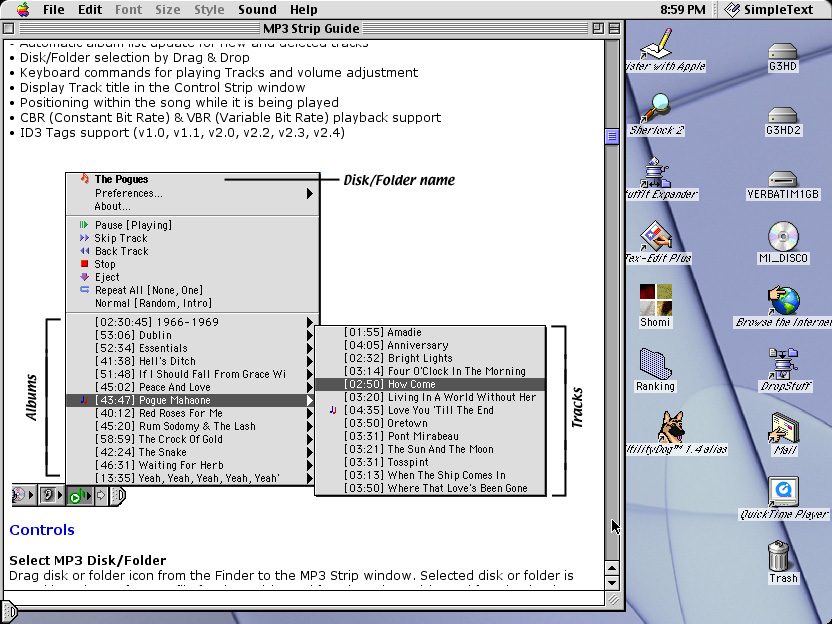
MP3 Strip is the Control Strip Module what lets you playback audio MP3 files. It plays the most popular MPEG Layer 3 audio file format.
Installation
Just drag MP3 Strip onto your Control Strip window or copy it into the Control Strip Modules folder what resides in the System folder. To uninstall MP3 Strip press and hold the Option key and drag MP3 Strip from the Control Strip window to the Trash.
Note: If you use Extensions Strip 2 or later then turn on the “Give idle time to hidden strips” checkbox in the Extensions Strip control panel.
Features
• Very small and easy to use audio MP3 player
• Always ready for use
• Automatically album list collection
• Hierarchical menu in the album list
• Sorting by Album, Artist or Folder name
• Quick Load album list from the preference file
• Automatic album list update for new and deleted tracks
• Disk/Folder selection by Drag & Drop
• Keyboard commands for playing Tracks and volume adjustment
• Display Track title in the Control Strip window
• Positioning within the song while it is being played
• CBR (Constant Bit Rate) & VBR (Variable Bit Rate) playback support
• ID3 Tags support (v1.0, v1.1, v2.0, v2.2, v2.3, v2.4)
http://freakshare.net/files/zo74dbec/MP3STRIP.SIT.html
CompatibilityArchitecture: PPC
• Macintosh with PowerPC processor
• Mac OS version 8.6 or later
• QuickTime 4.1 or later installed
• Control Strip Extension version 2.0 or later