
This page is a wiki. Please login or create an account to begin editing.
Architecture: 68k PPC
Extensis PhotoText Solo 2.0



| Rating: | |
| Category: | |
| Year released: | |
| Author: |
Extensis |
| Publisher: |
Extensis |
Download phototext-solo-2-img.sit
(738.63 KB)
For System 7.0 - 7.6 - Mac OS 9
For System 7.0 - 7.6 - Mac OS 9
This Photoshop plug-in was released as a freeware promotional sweetener to the full PhotoTools set. Hence the word "Solo" in the name "PhotoText Solo". PhotoText is one component of the commercial set of Photoshop plug-ins, Extensis PhotoTools 2.
Archived as Disk Copy 6.3 image and compressed as StuffIt 5.5 ".sit" archive.
MD5 checksum & filename: 366a825e872d90c55d9f6a71e835abee *phototext-solo-2-img.sit
PhotoText Solo adds fine control over Photoshop's typography. - Especially in older versions of Photoshop.
PhotoText is a powerful WYSIWYG text formatting module, with features such as:
• Multiple text blocks
• Character style sheets
• Individual character color
• Expert kerning, tracking and leading controls
• More character formatting choices - bold, italic, underline, outline, shadow, allcaps, smallcaps, character width and height, and left, center, right & full justification.
• Save feature allows you to save your text blocks for future re-use or editing. Saved text blocks remember all their formatting and positioning.
[See Also]: PhotoTools 2.0.2 and PhotoTools 3.0.3
CompatibilityArchitecture: 68k PPC
PhotoText Solo requirements:
• Photoshop 3.0.4 or later
• Macintosh 68040/25 MHz or faster, or PowerPC processor
• Macintosh System Software 7.5 or later
• It does not work in any other application which supports Photoshop plugins
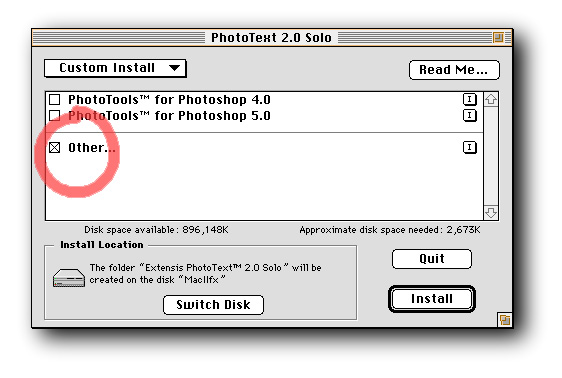
To install PhotoText Solo 2 on Photoshop versions 3, 5.5, or 6, choose a "Custom" install then check the "Other..." check-box, only (see pic 2 above). The custom install program first installs the user manual to a folder on your drive separately (you can choose a location anywhere on your hard drive). Next, it asks you where you want to place the PhotoText Solo 2 plug-in filter, for this 2nd step choose the Plug-ins folder of your Photoshop folder.
Comments
Thanks 24bit, much appreciated
Six bundled plugins working with Photoshop5. Quite useful, as far as I can tell.
If the provided serial refuses, you may also try: HMU-100-100-100-009409.