
This page is a wiki. Please login or create an account to begin editing.
Architecture: PPC
Restore Desktop


| Rating: | |
| Category: | |
| Year released: | |
| Author: |
Alex Grec |
| Publisher: |
Kanex Group Inc. |
Download restore-desktop-2.sit
(8.91 KB)
For Mac OS 8 - 8.1 - Mac OS 9
For Mac OS 8 - 8.1 - Mac OS 9
Ever play a game on your Mac and the icons get screwed-up badly when the game finishes and returns the screen back to your usual display settings? Restore Desktop v2.0 comes to the rescue.
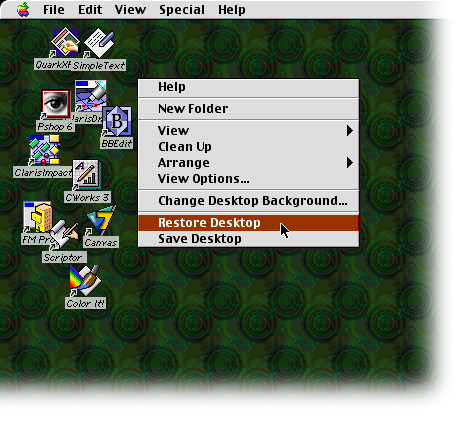
Restore Desktop is a Mac OS Contextual Menu Plug-in that saves and restores icons' positions on the Mac desktop. Restore Desktop restores icons' position automatically during display resolution changing. Restore Desktop also allows you to restore saved icons' positions manually by Control-click on the Mac desktop.
MD5 checksum & filename: 472de75c09522c1139ead63b6d1edff4 *restore-desktop-2.sit
How to install
Move Restore Desktop to the Contextual Menu Items folder inside your System folder and Restart your computer.
How to use
Control-click (or right mouse button click) in the Mac desktop to open the contextual menu. The contextual menu will contain two additional items "Save Desktop" and "Restore Desktop". Select "Save Desktop" to save current desktop icons' positions for the current display resolution. Select "Restore Desktop" to restore previously saved desktop icons' positions for the current resolution. Save icons' positions for the display resolutions you are using after the installation. When you change the screen resolution, icons are automatically restored to the saved positions for that resolution.
Architecture: PPC
Restore Desktop Requirements:
• Mac OS 8.0 to 9.2.2
• PPC Macintosh or compatible or SheepShaver, only