
This page is a wiki. Please login or create an account to begin editing.
Architecture: PPC
SoftWindows 98


| Rating: | |
| Category: | |
| Year released: | |
| Author: |
Insignia Solutions |
| Publisher: |
FWB Software Inc |
Download SoftWindows_98_Install.img_.sit
(10.67 MB)
For System 7.0 - 7.6 - Mac OS 9
For System 7.0 - 7.6 - Mac OS 9
Download SoftWindowstm_98_Install_CD.sit
(216.54 MB)
For System 7.0 - 7.6 - Mac OS 9
For System 7.0 - 7.6 - Mac OS 9
Download WIN98DATA.toast_.sit
(289.24 MB)
For System 7.0 - 7.6 - Mac OS 9
For System 7.0 - 7.6 - Mac OS 9
Download softwindows_update509.sea_.hqx
(1.54 MB)
For System 7.0 - 7.6 - Mac OS 9
For System 7.0 - 7.6 - Mac OS 9
Emulation
Guides on emulating older applications
Guides on emulating older applications
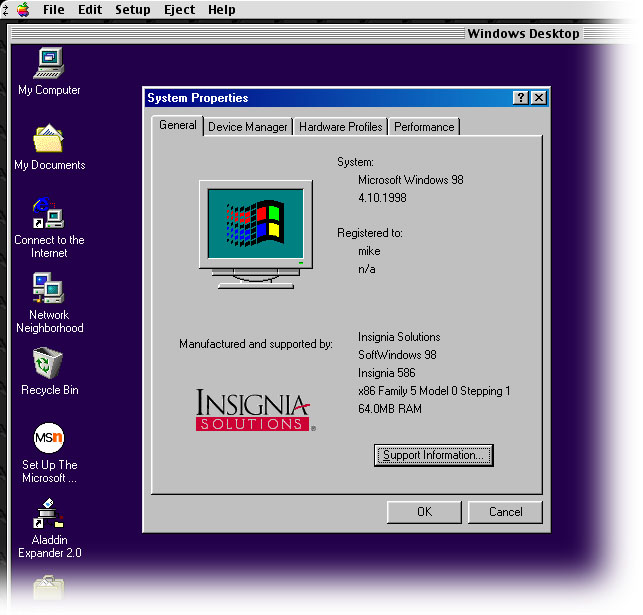
SoftWindows 98 emulates a Pentium MMX PC, allowing you to run Windows applications and games alongside your existing Macintosh applications.
It will perform all the tasks you would expect from a PC. The faster your Macintosh, the faster the performance of SoftWindows 98. SoftWindows 98 has Windows 98 pre-installed, so you can immediately run Windows applications on your Macintosh.
Top download contains a compressed StuffIt archive containing a Disk Copy 6.1.2 ".img" file of SoftWindows 98 5.0.4 installer. Not a full installer, you have to use Custom Install and select everything but the Windows 98 Data Files & Master Hard Disk to get it installed (unless you also DL & use the 3rd WIN98DATA DL above).
MD5 checksum & filename: 29ECFD0813B37176845BB009EA309BBB *SoftWindows 98 Install.img.sit
2nd download is the full SoftWindows 98 install CD, toast image, compressed in StuffIt 5.x format (installs SoftWindows 98, version 5.0.4).
MD5 checksum & filename: 3fc8803f53ae82f4e790be540c58cadd *SoftWindowstm_98_Install_CD.sit
3rd download is for the Windows 98 data disk, this CD image is required for full installation. Once again, a toast image in StuffIt 5.x format.
MD5 checksum & filename: eb648c0f5edc949172d688a109d01e4f *WIN98DATA.toast_.sit
4th download, the official update patch to version 5.0.9, necessary to run SoftWindows 98 on Mac OS 9.x (1.54 MB)
MD5 checksum & filename: 415f410edd9c59d5f92e70c3718bd585 *softwindows_update509.sea_.hqx
See also: SoftWindows 1.0, SoftWindows 2.0, SoftWindows 3.0, SoftWindows 95
CompatibilityArchitecture: PPC
Any Power Macintosh, including G3, PowerBook and iMac.
System System 7.1.2 or later.
32 MB RAM recommended (give 80+ MB if you can spare it).
Hard disk space 300 MB
Any Macintosh compatible CD-ROM drive.
[Important]: OS 9 compatibility only with the 5.0.9 update.
Comments
Not so good then, sorry to hear that. I suggest that you check your original DL's MD5 checksum, which should return:
3fc8803f53ae82f4e790be540c58cadd *SoftWindowstm_98_Install_CD.sit
I agree about what you say for SoftWin 95 tho' it was a lot easier to install in comparison (only one install CD helps).
You can install SW98 from a mounted image instead of the CD, if you opt out of installing a hard drive (so it won't ask for the 2nd CD). Then use the installed hard C drive from SoftWin95, this you can "upgrade" to Windows 98 using the WinDATA98 CD.
I appreciate your help very much, but unfortunately it still doesn't want to install.
After launching the installer, I get the initial install screens, then it throws up a "This is not the correct Softwindows 98 Install Disk." and kicks out the CD. I push it back in and I just keep getting the same loop back telling me it is not the correct install disk.
What is funny about it is SoftWindows 95 installed and runs just fine-just finished Solitare as a test of it.
If you change your mind, try these steps as a workaround... For Mac OS 9.2.2
Mount disk image 1, "SoftWindow98™ Install.toast" onto your desktop, either using Toast Titanium 5.x, or the Virtual DVD/CD Utility (available here at the garden).
In Toast, choose the option "Mac OS CD" from under the "Data" tab. Drag the mounted CD icon, "SoftWindow98™ Install" into Toast's window. The CD image and its contents fill the Toast window. Next burn the CD & eject. Check to see if CD mounts OK.
Do not mount the 2nd disk image "WIN98DATA.toast". Instead launch Toast and choose "Disk Image" from under Toast's "Other" tab. Drag the 2nd disk image file into Toast's window, Toast recognizes this image as being an ISO 9660 disc. Burn the 2nd image to CD.
Quit Toast and load CD 1 "SoftWindow98™ Install" and run the installer from the CD.
The install should proceed OK at this point, at least this is what worked for me (G4 eMac, Mac OS 9.2.2). Once installed, run the update so it can run under OS 9.x OK.
A couple of issues to watch for:
Booting Windows 98 for the 1st time it will want a Windows activation key. This is not supplied, you'll need to find one. Preferably before you boot into Win 98 for the 1st time.
During the 1st boot, Win 98 will want to set up a printer. If you go ahead, it will ask for the Windows 98 CD so it can find a driver. So if you choose to install a printer at this point you will need the Win98DATA disk at hand, also.
Otherwise it all installs very easily, or at least it has done for me. Give SoftWin 98 at least 100 MB RAM and set the video to 4 MB. It runs smoothly at full screen rez (1152 x 864 for the eMac) in millions of colors this way.
I could not get it installed under OS 9.2.2 (actually booted-not emulated). I grabbed downlaods 2, 3, and 4. Mounted them in Toast, made the CDs. The installer starts, createds the hard disk, then crashes saying the CD was invalid.
So I tried again, then got a message saying it could not install, but did not say why.
I rebooted to Base Extensions and got the second message again.
Tried to just use the Toast files and install from the hard drive, but again it quit and didn't say anything other than there was an unknown error.
I give up.
@eastone: Just perfect! Thank you.
I uploaded 5.0.9 update
Excellent to have the complete CD install images, thank you macjames.
I've hit another brick wall with this tho'. My classic capable hardware (a G3 & G4) are running Mac OS 9.1 & 9.2.2 respectively. It appears that we need to patch whats here to version 5.0.9, for Mac OS 9 compatibility. As it is, I cannot get beyond the Win 98 splash screen before it fails.
All links I've found for the patch are dead. The Internet Archive has the original FWB page archived, with the DL links for the patch as a ".hqx" file, but its broken. It DL's about 1MB of the 1.6MB patch, then halts.
So if anyone has the 5.0.9 patch stored away, please upload it to this page.
Could you put some screenshots please?
Offtopic: eBay have listed the SoftWindows 98 package.
Have you make it worked?
P.S.: I have found some SoftWindows 98 listings in eBay.
Fortuna, thanks. That's actually what I had to do to get this up and running. Its not an ideal solution but yes it works.
Mike, SoftWindows 98 can also read SoftWindows 95 hard disk files as stated in the user's guide. Just use the SoftWindows 95 hard disk, mount the Windows 98 Upgrade CD and upgrade to Windows 98. See the user's guide page 21 for more info.
Have tried this out since last post. Its very incomplete. Not only do you have to do a custom install to avoid errors and demands for the missing Installer CD. Despite it lacking a Windows 98 Master Hard Disk, it cannot even create an empty bootable "C Drive" without the missing Installer CD. In can create a non-bootable "D Drive", but without a bootable "C Drive" file, it makes it even more difficult to install an OS onto it.
A full Installer CD image upload is required.
@FW: Can't you just use any Windows 98 install CD with this? Easy to find one of these (WinWorldPC). I haven't tried, maybe I should.
I believe that SoftWindows 98 were came in CD, which includes an installer and Windows 98 master hard disk file. The download link above is an installer, however it refuses to install which shows a dialog box asking the SoftWindows 98 Install CD. The full CD image can be downloaded at Pandora Wired Server, however I can't access them.
How to install this?
rly? As I recall, I managed to download it just fine before.
reupload
Not your fault, I believe that it's a recent decision by a number of file hosting sites.
I concur with bertyboy. The message for me when visiting this link is: "File is not available
Only the uploader of this file can download this file." It appears that only you have access to this file, TataMisia.
rly?
Maybe you must sign up to UploadStation.... I dont know...
alas uploadstation only allows the original uploader to download this
It's install version. Not CD
This is not the full CD and I cannot download it. Re-upload it to MediaFire and make sure it's full CD.