
This page is a wiki. Please login or create an account to begin editing.
Architecture: PPC
StarOffice 3.1



| Rating: | |
| Category: | |
| Year released: | |
| Author: |
|
| Publisher: |
Star Division |
Download staroffice3.1_ger.toast_.sit
(42.00 MB)
For System 7.0 - 7.6 - Mac OS 8 - 8.1
For System 7.0 - 7.6 - Mac OS 8 - 8.1
This is StarOffice 3.1 by Star Division.
See also en.wikipedia.org or de.wikipedia.org for details.
During Installation, some new fonts has been installed. To use them with other applications as well, a restart is required ("Während der Installation wurden neue Zeichensätze Installiert. Damit diese allen Programmen zur Verfügung stehen, ist ein Neustart erforderlich".) "Neustart" would perform the restart, but "Beenden" just exits the Installer application.
It's recommended to de-active Third-party utilities that change the GUI of the Mac OS.
CompatibilityArchitecture: PPC
- Runs from Mac OS 7.5 to 8.1
- Although the architecture shipped on CD-ROM is 68k + PPC, according to NativeChecker, the Installer application will only install on PowerPC based machines.
- The installation software will detect your OS and install either for English, German or French language menus.
- To have English dictionaries installed; Perform a Custom install (and check everything).
- Only German and English UK/US dictionaries are available with this installation. Choose a dictionary by selecting the region in Options menu under Tools menu.
- All on-line documentation including Help, is in the German language only.
Comments
Indeed.
Incidentally, I have several (unofficial) OpenOffice suites version 3.x for PPC Mac OS X, These weren't released on the official site, as by then PPC Mac OS X was obsolete. But the person[s] in charge of compiling OO for intel Mac, also compiled mirror copies for PPC (Tiger). They are PPC native too (X11 not required).
When I'm looking for another option for using an Office suite,
instead of using the iWork package in the future, I found OpenOffice as well.
But why?
When the only option to get the iWork package is the download,
why should I pay for it if I get another, free office package?
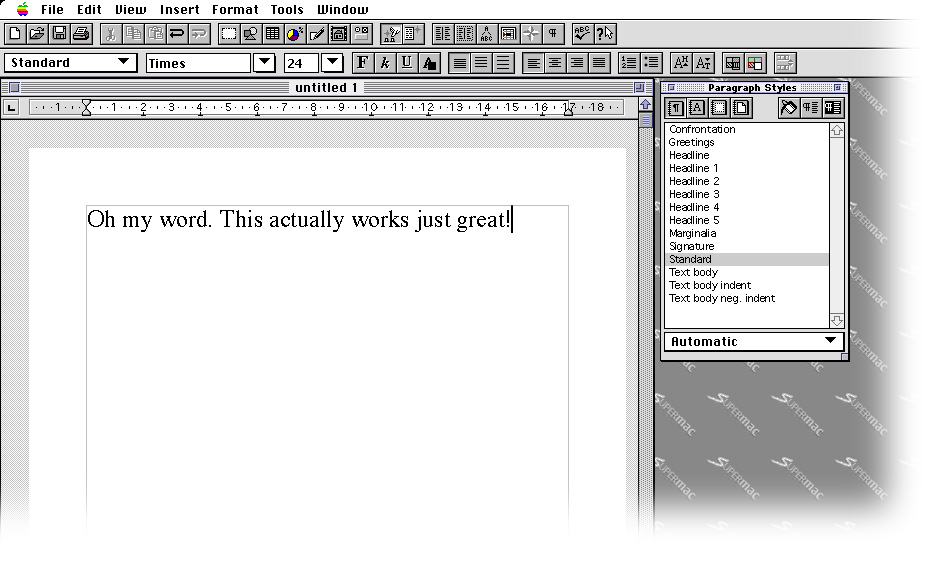
This is such a nice app to use. OK a lot of rough edges, but on Mac OS 7.6.1 PPC, this is great. Instantly recognizable of what was to become OpenOffice, but also very similar to the best Office suites and word processors of the day, with it's ribbon tool bar a la MS Word 5.1 and the visible printer margins of MacWrite II, Pro and ClarisWorks (all). Its an excellent software to use.
I'm finding OS 7.6.1 to be a very stable OS to use on SheepShaver, so StarOffice 3.1 is a welcome addition here with this OS, too.
Nope, sorry--I'm out in the corn in Middle U.S.A.
Thanks for the kind offer. But like me, do you live in Australia?
Actually I'm after only the zif socket CPU, pulled from either a beige or a b/w Mac G3, not the whole box of goodiesAnd I got my Zif socket CPU on ebay. Yay, quest ended
I have a beige minitower G3 266MHz that you're welcome to have for only shipping costs.
@xy:
Say, I really would like one of those
The original beige G3's shipped with Mac OS 8.0 & 8.1, which would be a compromise for me - StarOffice 3.1 wouldn't have a problem there. - I do have a beige G3 but unfortunately I bought it as already upgraded with Sonnet G4 cpu. I'm hoping to downgrade this back to a G3 at some stage.
...download link for free StarOffice 4 beta (Mac)...
Been there done that, too... I don't think this will be an easy find.
The download link for free StarOffice 4 beta (Mac) used to be
http://support.stardiv.de/service/download/SO40_Beta/Mac/so40mac.asp
Alas, the link is dead and www.archive.org has not saved it.
"You should try this on OS 7.5.5"
MikeTomTom, a Mac OS 7.6 ROM for G3s and G4s is a desideratum indeed! The system probably would fly so fast that multitasking is unnecessary ...
@IIGS_User: This is precisely what I was thinking. This software's menus fail in Mac OS 8.5 & newer because they are not compatible with the Appearance Manager now built into the Mac OS since 8.5
Prior to 8.5 the Appearance Manager (introduced with Mac OS 8.0 ) was not built into the OS and it was backwards compatible with software not requiring the Appearance Manager (it could even be tuned not to activate in non-Appearance Manager aware applications). Since 8.5, the Appearance Manager is built into the OS and cannot be tuned for older software compatibility. This doesn't affect all software created before Mac OS 8.5 obviously, but it does affect some.
How this prevents StarOffice 3.1's menus from failing I don't know, but I'm thinking that this is where the problem lies.
Thanks for the comments, revised to reflect up to 8.1 usability.
Maybe the GUI changes made by Apple in later OS versions prevents StarOffice from working,
while Star Division recommends to disable 3rd-party utilities that change the GUI elements
(Later GUI changes made by Apple surely reflect the same behaviour than 3rd-party GUI changers
created for earlier Mac OS versions) .
@xy: You should try this on OS 7.5.5 it goes off like a rocket, much faster even than on 8.1 - 9.x very responsive stuff (and all the menus work too).
The only update I know of was that it went to version 4.0 beta and that was the end of Mac development until OpenOffice.org - finding a copy of that 4.0 beta would be pretty hard to achieve I guess, given how rare this version of IIGS_User's is.
@IIGS_User: I think the version compatibility needs to be revised down to 8.1 - Its great that it works so well on 7.5 to 8.1, but the lack of usable menus in 8.6 and later is a real problem. I've yet to install 8.5 and it test on that, but 8.1 is OK.
Out of interest I also installed it on PPC Classic on a Mac running Tiger, 10.4.11 - results was the same as if running on 8.6 and above, sad to say. Man I wished it could've run OK on Classic too, its such a nice set of software to use.
[Edit] Just to confirm: Have installed onto Mac OS 8.5 and SO 3.1 Menu items are broken at this point.
II GS User, I can confirm for the native envornment: Tested StarWriter (minimal installation) on Mac OS 9.2.2 native. It started extremly quickly (much faster than Nisus Writer or WordPerferct) but than almost nothing worked and system froze.
Is there an update for Mac OS 9 like v3.5?
The de.wiki page linked above lists v3.1 as to be compatible with Mac OS 7.5 to 8.0,
I think this entry should reflect that given OS information?
Thought we could write up to 8.1, for sure.
When running this in Sheep with 9.0.x installed, I had not noticed "File -> Exit" doesn't work (in German language version) . Checked again with English language version now, but exited fine.
@macjames: You are correct. Menu items appear to be broken in 8.6
I had only tested this in Mac OS 7.5.5 - I've since tested it in 8.6 and 8.1 - Mac OS 8.1 is OK. I don't have an 8.5 system to test on. I'll see how it fairs on OS 9 next, too. [Edit] Same on 9.0.4 as with 8.6
So perhaps this software is 100% OK on 7.5 to 8.1 systems only.
Maybe it's just me, i need more testing. I installed this suite under a fresh copy of MacOS 8.6 and while everything installs and opens fine, the menus are like dead. You can select them but they do nothing. The quickest example is, if you want to quit the application, you go to File-Exit (yes, they didn't put Quit), and it does nothing. However command-Q works perfect. Will test it under my all time favorite OS 7.6.
MikeTomTom,
nice hints about installing the software.
We need to archive them.
Also French Its easy to choose either German, English or French menus via the OfficeManager, a launcher app before you launch Writer or Calc, etc. Although there seems to be only German & English (UK/US) dictionaries, and all documentation, Help etc, is in German language only.
To install English dictionaries, Do a Custom Install and install everything. This is very cool software.
[Edit] It appears that the English dictionaries are for both US & UK spelling, choose by selecting the region in Options menu under Tools menu (may require a program restart).
Nice to see it includes English language as well, this is very appreciated.
Both CD booklet and the print on disc are written in German.
Very interesting to see this. Thank you. I wonder if there is a US or UK language version available too... anywhere?
[Edit] Asked too soon The installer installs English language as well. It detects the System its installing to and installs appropriately. Other languages? I don't know. I haven't run it long enough to check dictionaries, but the menus are all in English on my install. Great!
Many, many thanks for this upload, IIGS_User. This is a very rare software and it is the true parent to OpenOffice & LibreOffice.
Now if only OO & LO could launch as fast and feel as snappy as SO 3.1