
This page is a wiki. Please login or create an account to begin editing.
Architecture: 68k
Virtual 1.0


| Rating: | |
| Category: | |
| Year released: | |
| Author: |
Pierre-Luc Paour |
| Publisher: |
|
Download Virtual_img.sit
(55.90 KB)
For System 7.0 - 7.6 - Mac OS 9
For System 7.0 - 7.6 - Mac OS 9
Emulation
Guides on emulating older applications
Guides on emulating older applications
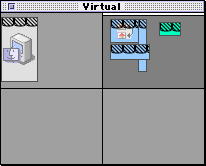
Virtual allows you to use "virtual screens" / "desktops" for different uses (similar to Spaces in Mac OS X). Window icons can be dragged from one virtual screen to another in the floating palette window. You can switch virtual screen using the palette window or a keyboard shortcut. The number of virtual screens and the scale of the floating palette window can be changed in the preferences.
The application is on a Disk Copy 4.2 disk image (1.44MB) inside a StuffIt 3.5 archive.
CompatibilityArchitecture: 68k
System requirements: System 7.1 or better, Colour QuickDraw, 200k free RAM. TheRead Me also says to install the included TSM Fix extension for System 7.1 if using the floating palette window.
The Read Me file says one of the future upgrades will include a FAT version, which may or may not ever have been created.