
Does anyone have a disk image of the Hard Drive Installation disk for the HD20 SC? I need it to make it work with my Mac Plus!
This page is a wiki. Please login or create an account to begin editing.


2015, February 4 - 2:43am
#1
Apple HD20 SC
Comments
2015, February 4 - 3:16am
#2
You shouldn't need an install disk, it should just work.
2015, February 4 - 5:51am
#3
It doesn't. Darn.
2015, February 4 - 10:33am
#4
You might have a bad HDD in there
You need to get some version of apple HDSC setup and try to reformat it, The version of apple HDSC setup on the system 6.0.8 install floppies should do fine
If that can't reformat it you will need to replace the hdd in there, any 5.25" or 3.5" 50pin scsi HDD will do. But I would recommend you get a newer server grade SCA drive and a 50 pin adapter (I actually make SCA -> 50pin scsi adapters, but you wouldn't really need one of my fancy terminated adapters as you would have external termination of the drive)
2015, February 5 - 5:50am
#5
I'll look through my box of miscellaneous Mac stuff, but I'm about 99% positive I have the floppy. I know for sure I have the manual(and the hard drive) and am pretty certain I picked up the floppy from the same source.
Just to make sure...I know mine probably takes a full minute or so to be "ready" after it's switched on. The proper start-up procedure-at least as I understand it-is to flip on the hard drive, wait for the light on the front to stop flashing, and then turn the computer on. I've used mine extensively with my Macintosh SE(I've had issues replacing the internal hard drive) and it always works if I do this, but generally doesn't if I try to power up the computer before letting the drive come to life. Those big old platters take a long time to spin up.
2015, February 5 - 6:08am
#6
Okay, I think I found the disk you're looking for.
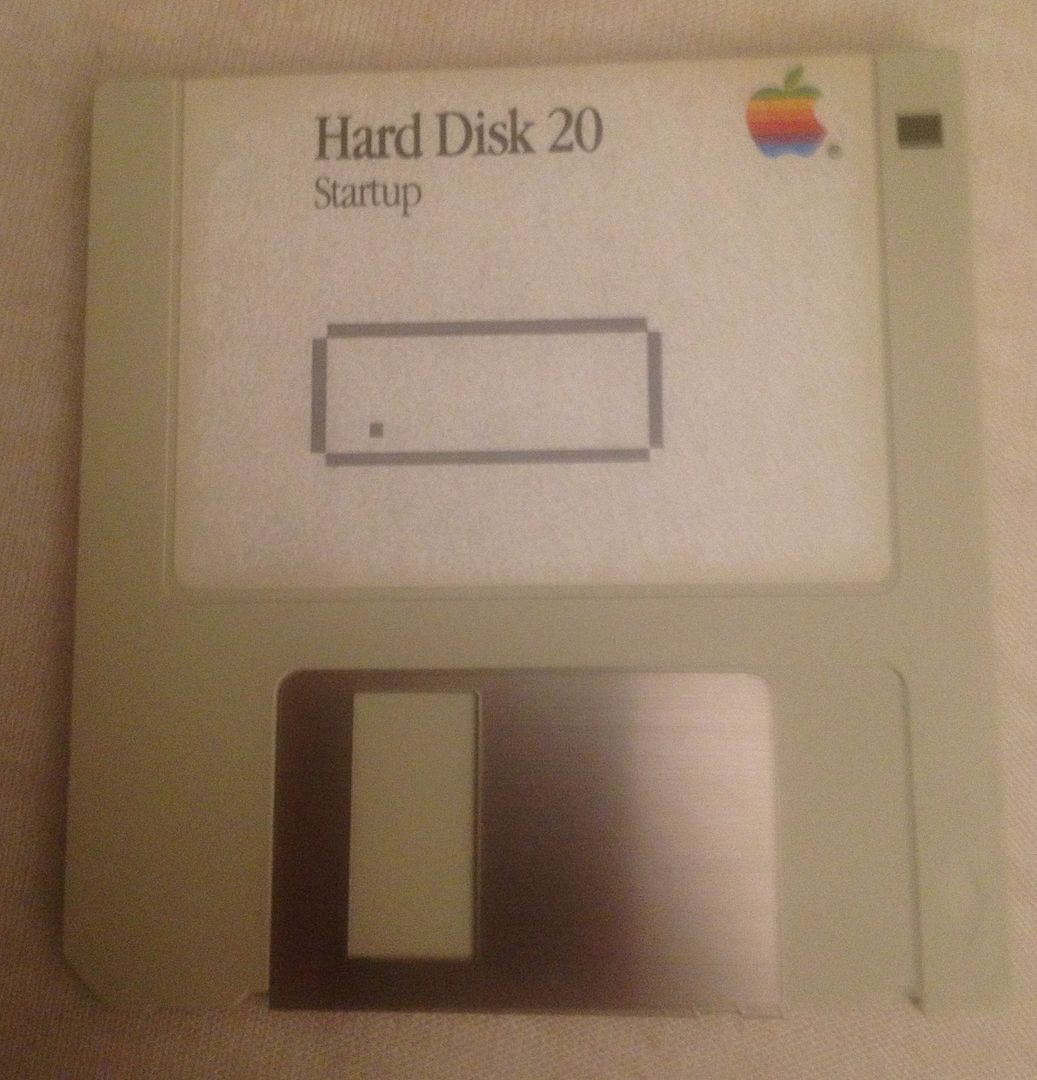
Unfortunately, the disk drive in my beige G3(which is what I normally use for this sort of stuff, since it has a USB card and I can dump the images onto a zip drive) told me that the disk was unreadable and wanted to initialize it.
If we get a snow day tomorrow  (a very small possibility) I'm going to try and rebuilt the drive in my Q700...hopefully I'll be able to image it on that and then dump it onto a zip disk and in turn use that to get the file to an internet-connected computer. Or, failing that, I'll try in the external drive on my SE(the internal on it needs to be rebuilt also).
2015, February 5 - 10:00am
#7
Okay, I think I found the disk you're looking for.
@bunnspecial: This disk will have the drivers for the Hard Disk 20, a Non-SCSI hard drive designed for the Macintosh 512K. Sad to say, its not for the SCSI hard drive, Hard Disk 20SC.
Also; The reason why your G3 is giving you grief on imaging this disk, is that its OS does not support MFS 400K single density disks, which this will be. Your Q700 should fair better, if it's Mac OS predates version 8.0 (and being a Q700 this is quite possible & likely).
It would be good to have this disk archived and uploaded to the MG, all the same.
2015, February 5 - 8:55am
#8
@bunnspecial:
I'll look through my box of miscellaneous Mac stuff, but I'm about 99% positive I have the floppy.
Unfortunately, the disk drive in my beige G3(which is what I normally use for this sort of stuff, since it has a USB card and I can dump the images onto a zip drive) told me that the disk was unreadable and wanted to initialize it.
It would be a good idea to dump also the other floppy disks in your Mac stuff box as soon as you have some spare time again because these disks are now almost 30 years old and their data might be already got corrupted by now.
Once you have the images of the disks, you can can format the (broken or new) floppy disks and copy the image back to them.
2015, February 5 - 5:21pm
#9
Thanks...I guess I hadn't dug into this deeply enough. I didn't realize that the 20SC was different from the HD20.
I'm told that my working HD20 is actually a bit of a rarity.
My Q700 is running system 7.5.5. I also have a 7100 running OS 8 that I've been planning to downgrade to 7.5.5(mostly so that I can use it as a localtalk-ethernet bridge for my Laserwriter 300). That would probably be easier than getting the floppy drive working in my Q700.
In any case, the suggestion to image and archive all the stuff I have is a good one-I actually have pretty much the full set of system disks that shipped with the Macintosh II and several other early Macs. If I get around to doing this, I'll upload the images here.
2015, February 5 - 8:52pm
#10
I'm told that my working HD20 is actually a bit of a rarity.
I would say so. Your drive predates the inclusion of SCSI in Macintosh, from Plus to Beige G3. And it works!!
I wish I hadn't given away my Q700 some years back now, it was a lovely machine. So good luck with getting it restored fully.
If you do get around to archiving your floppy collection, please use Disk Copy 4.2 and Stuff the resulting image files with an early version of DropStuff or StuffIt Deluxe (version 5.5 or earlier preferably) before uploading.
2015, February 6 - 12:43am
#11
I actually removed my Q700 from its original owners office a few months back. It was on a computer desk next to a beige G3 desktop(I got that one also). Before I removed the computer(I'm the unofficial department Mac "expert", such that those things go, so got the task of actually physically unhooking and packing things up) I hit the power button on both computers. The Q700 booted right up, but the G3 got stuck at the "Happy Mac." Interestingly enough, there were files on the Q700 from as recently as 2010...despite the fact that there was a 2004 model 1.42ghz eMac sitting on the other side of the office.
In any case, I traded some G4 MDD parts to someone on Macrumors for a pair of NuBus video cards-a Radius Precision Pro 24x and 24xp. I stuck the XP in the Quadra, and have it driving an Apple 16" Multiscan CRT with 24bit color at 640x480. The card will actually go up to 1152x870 at 24bit color, but it gets "fuzzy" and difficult to read at that resolution.
Unfortunately, the floppy drive was caked with dust(I actually spent about an hour picking dust out of it with a pair of tweezers) but I think it needs a full tear down and re-lube to work. I have a spare 500mb hard drive that I'm planning on installing and migrating everything to, and then putting the stock 160mb drive over to my SE(its original 20mb drive is dead).
I have to say that I think the Q700 is my favorite 68K Mac-it has the 68040 processor, and balances decent expandability with a fairly small footprint. I love mine-I just need to get the floppy working! Fortunately, I did get at least get a SCSI Zip drive with it.
2015, February 6 - 9:05pm
#12
Very nice indeed, scoring all that kit. Though I would ditch the multi-scan and use a flat screen display (one of the earlier 17" or 19" non-wide displays). I would like to get my hands on a half-decent Nubus video card too, but it would also need an adapter for a low profile case. I have a (pre-Quadra) Centris 660av, which I would swap for a working Q700 in a flash 
2015, February 7 - 2:51pm
#13
I have about a dozen 17" 4:3 flatpanels lying around(dumpster diving at surplus-no one wants 4:3 screens anymore). Unfortunately, the only DB-15 to VGA adapter I've ever found to work is the Apple one that shipped with some of their early VGA monitors. I have one-it came with the B&W G3 and 17" "Blueberry" CRT I was given a while back-and it's currently in service on my 7100.
I have one of the Chinese-made ones with DIP switches, but have never actually been able to get it to work...
2015, February 7 - 4:04pm
#14
Thats probably because there is a billion settings for those adapters and no two macs seem to like the same settings. If you dig up the sheet with the settings and just try every one you will probably get the adapter to work
2015, February 6 - 9:29am
#15
Hi new here,first post,happy to find this place, an yes i do have that Icon,will send it.
Cheers
Sorry didnt see the entire post,i can still help u out,let me no.
cheers