This page is a wiki. Please login or create an account to begin editing.


2 posts / 0 new
Last post
Nicolas Bahamondes's picture
Joined: 2011 Jun 16
Fake "Findexplorer"?

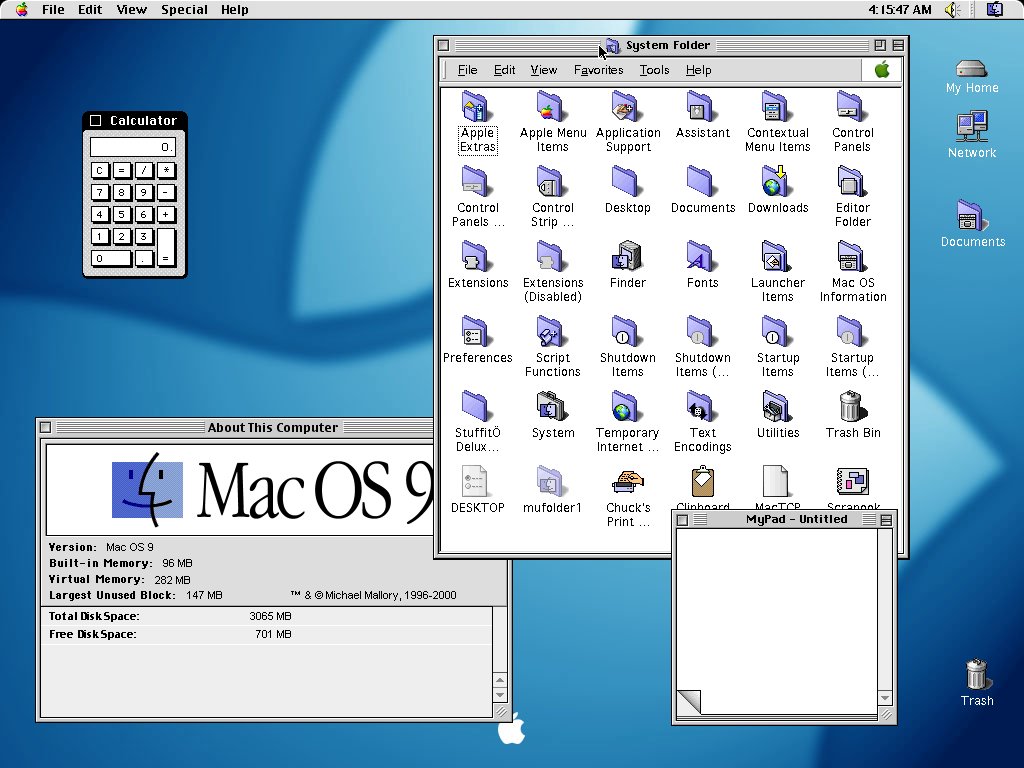
I was looking for strange images in Google and I've found this supposedly screenshot of an OS9 desktop, showing a very "familiar" file explorer window. Can you guess?

[img]http://winmac.emuunlim.com/Images/Screenshots/OS9.jpg[/img]

(I don't know ATM how to embed (img) tags).

Comments

MikeTomTom's picture
Offline
Joined: 2009 Dec 7

Fake "Findexplorer"?

It looks like someone had a lot of time on their hands, as thats quite a good mock-up of OS 9... The "About This Computer" window looks suspect, but the menubar in the System Folder's window is the real give away. The URL to "winmac.emuunlin" is also bit of a clue Wink

(I don't know ATM how to embed (img) tags)

Its not difficult. If you want to simply provide a link to an image which will open in another page, then use an "a href=" tag, as in "check out this weird OS 9 pic". Or, if you want an image to appear inline in the comment you're typing into, use an "img src=" tag and add the link to the image in that.
See the w3shcools.com HTML Tutorial pages for some excellent free examples.