
This page is a wiki. Please login or create an account to begin editing.
Architecture: 68k
Xmas Lights 1.1


| Rating: | |
| Category: | |
| Perspective: | |
| Year released: | |
| Author: | Robert L Mathews |
| Publisher: | Tiger Technologies |
| Engine: |
Download xmas-lights-11.sit
(16.79 KB)
For System 7.0 - 7.6 - Mac OS 9
For System 7.0 - 7.6 - Mac OS 9
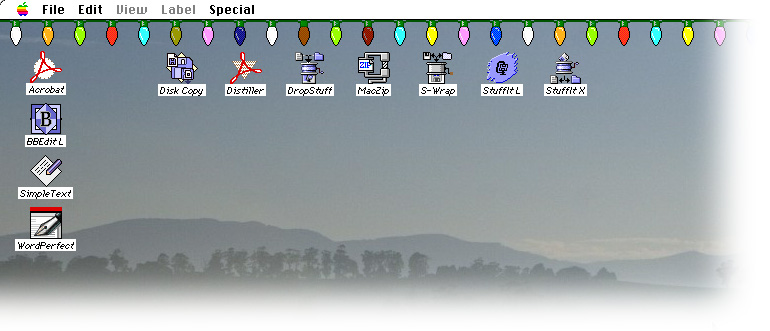
'Tis the time to be Jolly... Christmas Lights to decorate your Mac's desktop. This is a Control Panel which places a row of Christmas tree lights along the menu bar at the top of your Mac's display.
To install; Extract the Control Panel from the .sit file and drag it over onto the closed icon of your System Folder. Release the mouse when a dialog pops up to tell you that this CP needs to go where it needs to go. Restart your Mac and you should be greeted with a row of blinking colored lights.
From the Control Panel's Info:
Xmas Lights is a Macintosh control panel that places flashing Christmas tree lights under your menu bar, as if someone had strung them from the top of your screen. The control panel allows you to choose the flash pattern.
Xmas Lights should work on any Macintosh using Mac OS 7.0 or later; it looks best on a Macintosh with a color screen. To install Xmas Lights, drag it onto your System Folder and press “OK” when your Mac asks if you’d like it to be placed in the Control Panels folder. Then restart your computer.
Xmas Lights is absolutely free!
See also: Holiday Lights
CompatibilityArchitecture: 68k
Have tested this OK on Basilisk II (OS 7.5) and Sheepshaver (OS 8.6) and PPC G4 (OS 9.2.2).
Comments
Open your "Extensions Manager" Control Panel, click the check-box next to the offending item's name, restart SheepShaver or your Mac.
How do we get RID of this?!
Believe me, I love the app, but I'm sick of seeing it every time I start SheepShaver!
@xy:
1). Because this is more a "game" than an "app". i.e; Other than being a mindless Yuletide decoration, that does nothing in particular (tho' like a "game", it may give someone pleasure). The "game" here, is to dress your Mac up like a "Christmas tree". This is something usually done out of enjoyment and is a tradition for many.
2). The games section also has a "Utility" entry. And "Xmas Lights" is a utility to "pretty up" your Mac at this time of year, should you choose to do so... for fun... frivolously... and for enjoyment... Aw forget it
3). ... because when all boils down to some undetermined definition... a "game" is also an "app" if one wants to get too pedantic...
If the Garden ever gets a separate entry for CDEVs and INITs, Xmas Lights could be more easily pigeon-holed ...Otherwise - it beats me why this, whatever it is, even exists.
Although this is a utility it seems to have been placed in the game section.