
This page is a wiki. Please login or create an account to begin editing.
Architecture: 68k
Virtual DVD-ROM/CD Utility



| Rating: | |
| Category: | |
| Year released: | |
| Author: |
|
| Publisher: |
|
Download VirtualCD_Imager_v1.0d0.sit
(23.74 KB)
For System 7.0 - 7.6 - Mac OS 9
For System 7.0 - 7.6 - Mac OS 9
Download virtualcd-imager-mod-img.sit
(53.49 KB)
For System 7.0 - 7.6 - Mac OS 9
For System 7.0 - 7.6 - Mac OS 9
This little application can mount and create Toast images from disks. Runs in OS 7.5.3 -> 9 at least. No need to rename filenames from '.toast' to '.ati'.
The 2nd DL above (53.49 KB) is for an updated version of the utility, now named "Virtual CD/DVD-ROM Utility" (version 1.0d1). This DL is a Disk Copy 6.3, 1.4MB floppy disk image file & compressed with Aladdin DropStuff 5.5, before uploading.
MD5 checksum & filename: b4967c78c44e6e4ca9836ceafa0433f2 *virtualcd-imager-mod-img.sit
Notable changes to this updated version are:
The User Interface:
The wording at the top of the UI and on the topmost button have been changed to give a clearer more meaningful indication of this Utilities potential (2nd screenshot above).
Resources:
Changes have been made to various resources. Mainly to update the icons, and version data and to add basic Balloon Help.
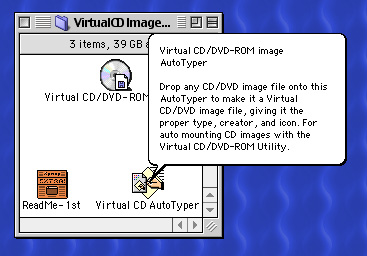
Added is a new Finder icon, for Virtual CD/DVD images that can now be auto-loaded by (or dropped onto) the Virtual CD/DVD-ROM Utility. Also included is "Virtual CD AutoTyper", a dropper program to assist in the process of making image files "Virtual CD/DVD-ROM Utility native".
See screenshots 2 to 5 above, for some of the new features.
See also: DVDExtractor (DVDExtractor's code is embedded into this utility's code).
CompatibilityArchitecture: 68k
68k code only, runs flawlessly on PPC Macs.
System Requirements:
- Any Macintosh physically or theoretically capable of mounting and reading CD-ROM media etc. This includes Macintosh clones and emulators, 68k and PPC.
- Macintosh OS from System Software 7.1 to Mac OS 9.2.2
- Macintosh CD/DVD Drivers (these are usually installed as Extensions by the System), if running Mac OS's prior to 7.5 you may need to locate these drivers and install them yourself:
- Apple CD Driver (or Apple CD/DVD Driver as installed by later OS's)
- Audio CD Access
- Foreign File Access
- ISO 9660 File Access
What may not work:
- Some image files are not CD/DVD .ISO compatible and will not mount onto a desktop using the Virtual DVD-ROM/CD Utility.
Such as, compressed image files, for example: Disk Copy 6.x compressed images, or Mac OS X .dmg files, etc.
An error message you might get if the Utility fails to mount an image file, is commonly:
"There are insufficient system resources to mount this image".
See the included SimpleText "ReadMe-1st" doc for more information and tips for some workarounds of this issue. - The included "Virtual CD AutoTyper" may not recognize files dropped onto its icon initially and doesn't appear to work. If so, then you need to Rebuild the Mac's Desktop Database to fix this issue.
For those unfamiliar with doing this housekeeping task for a classic Mac OS, instructions are here.
Comments
Looking at whats built into this utility (using ResEdit), I noticed that it has an earlier version of Coyote's "DVD Extractor" built-in to it, plus a bunch of "to be enabled at some later stage" menu commands and options.
The upshot is, the Virtual CD/DVD-ROM Utility can make quite a nice rip of DVD movies (under Mac OS 9.x). Then by using the included "Virtual CD AutoTyper" to make the resulting image auto-mount by double-clicking, the Virtual CD/DVD utility mounts the image then exits & Apple DVD Player detects a mounted movie DVD, launches and begins to auto-play the movie. Nice.
Downside is, it doesn't shrink the DVD movie to single-side DVD size & modern DVD protection can cause it to fail.
Discovery of the day: This thing will mount Disk Copy 6.x, 1.4 MB & 800k images if they've been saved as floppy disk image files. - Disk Copy gives a choice when saving a floppy disk to image file, as floppy disk image or a given file size e.g. 1440KB as opposed to 1.4MB floppy disk image. The floppy disk image option is "disk compatible" and will mount using this utility.
Like unzipping on Windows, you need to unstuff .sit files on the Mac, using Stuffit Expander.
Not sure what I'm doing wrong here but every time I try to open this I get an error message that says:
The document "VirtualCD_Imager_v1.0d0.sit" could not be opened, because the application program that created it could not be found.
Any help here would be greatly appreciated. I don't have much experience with Mac OS Classic so I'm sorry if this is just something stupid I'm doing wrong. =\
BTW: Ignore the implied (.ati message) and click the top button labeled "Mount Toast .ati file as Virtual DVD ROM" then use its dialog to locate your CD or DVD, .ISO, .Toast, .CDR etc, media image file to mount it onto your desktop. As long as the image file is an image of some CD/DVD type in good working order (can be burned to CD/DVD OK) it will mount.
This utility works for me in Mac SSW 7.1.1 or later (I haven't tried it in earlier Mac OS's). Some version of QuickTime may need to be installed also?
Thanks, I think this happened to me, and I couldn't figure it out.
"tried creating disk images using the utility for one of my games" I'd be careful about using this to make images; I don't think it is as thorough and compatible in that respect as Toast is. It is awesome at mounting them, though.
Just found a workaround: using IE's File Handling area, I noticed that this application handles files which have "VCDM" as their file creator. So I opened up good old resedit, and needless to say both disk images recently created with the program listed "CDr3" as their creator. So, I changed the creator information, saved my changes, and both images mounted without a hitch.
Basically, I'm in Mac OS 9.2.2 on my iBook G3, and tried creating disk images using the utility for one of my games (Starcraft). While they mount fine using drag-and-drop, I'd like to set up an extension binding so that I can write a script in Applescript to automatically mount the images and start the game.
Internet Explorer Prefs ?
Had a nice feature for handling downloaded files based on MIME type. Sure I've mentioned all this before. It basically updated the core "Internet Preferences" and set a file type and more importantly creator for each file type downloaded. Even though the preference was set in IE, it was reflected in all downloaded files. IE made it easy by letting you choose the app that the file should be opened in.
You'd just have to scroll through the long list of file types, or add a new one based on filename extension.
If you're in OSX (but you said File Exchange CP) then it's a different matter. Even OSX gets it wrong some time, I have .toast files appearing as Disk Utiility documents, only when I perform a Get Info does it correct the icon and launched app.
I've been running into some trouble myself getting the file exchange control panel to map .toast and .ati files to this program. Any suggestions?
Best way with this program (or any when dealing with files downloaded recently) is to open the application and use the file menu to select what you want to open, or in the case of this program, hit the big "Mount toast file..." button. Often files that you just downloaded have lost their filetype and creator information in transit, or the application you want to use them with isn't already mapped to their filetype.
Also, I keep an alias for frequently used programs like StuffIt Expander and DiskCopy or Toast on my desktop to make it easy for drag-and-drop.
To be certain; use drag-and-drop! Simply drag your image overthe icon of the application and drop it ontop of the icon. If the application recognizes it, it will open it, or at least try to.
I´ve only run Virtual DVD-ROM/CD Utility under emulation so far, but the application works up to 9.0.4 and also in my emulated 8.6.
So If I download this app on my old iMac OS 8.6, and double-click the .toast file, it should open the game?
Discovery of the day: This thing will mount DiskDup+ images!
Ah, I see. I was under the misapprehension that you had the original disc.
And that´s the culprit here; what I got and uploaded is an image. Originally from the great HL-era but nevertheless a copy! So that´s my ranting about the uncertainity of content, file- and disk names etc as I don´t have a original disk. But if this still is interesting to work with, I´ll up any of the two versions I produced.
I think the best bet would be a Toast image made directly from the disc. In fact, if there's some sort of sector-by-sector copy option it would be worth trying that.
It doesn´t make any sense ImHO, as the the image I have originally is a .IMG in HFS+ and that can be copied in OSX (my work and every-day system). However I´ve made a Toast image in HFS where I copied everything onto from my original IMG but this wasn´t recognized as CD-ROM by the game either. Any of these two images can upped if it´s of any use or for further investigation. Please state which one!
I should clarify: I'm specifically asking SwedeBear to make a disc image, as the one that's in the archive is (as I understand it) not adequate for actually playing Icebreaker. You can make an install from it, but it cannot be used to burn a disc that is validated by the copy protection.
Don't see why not.
Can you use it to make an image for Icebreaker?
And it seems to 'fool' the OS more efficiently than Disk Copy or ShrinkWrap when mounting images!
This is really a handy little program; can't believe I didn't hear about it before!
Well, me also. But it works like a charm even with images from Toast 9 mounting in OS 8!
Edit: eh, just struck me; ATI: Adaptec Toast Image…
Me, too.
I've always throught the extension for Toast files was .toast