
This page is a wiki. Please login or create an account to begin editing.


4 posts / 0 new
Last post
Offline
Joined: 2011 Nov 26
Basilisk II: Error installing Stuffit

I'm running the old version of Basilisk II (to avoid the black screen error) in Windows 7. I've got the STUFFIT.HFV file in my Basilisk II folder, and I have it as an installed disk in the BasiliskIIGUI. I've been trying to open the installer in Basilisk II, but every time I try to run it, I get this error message:
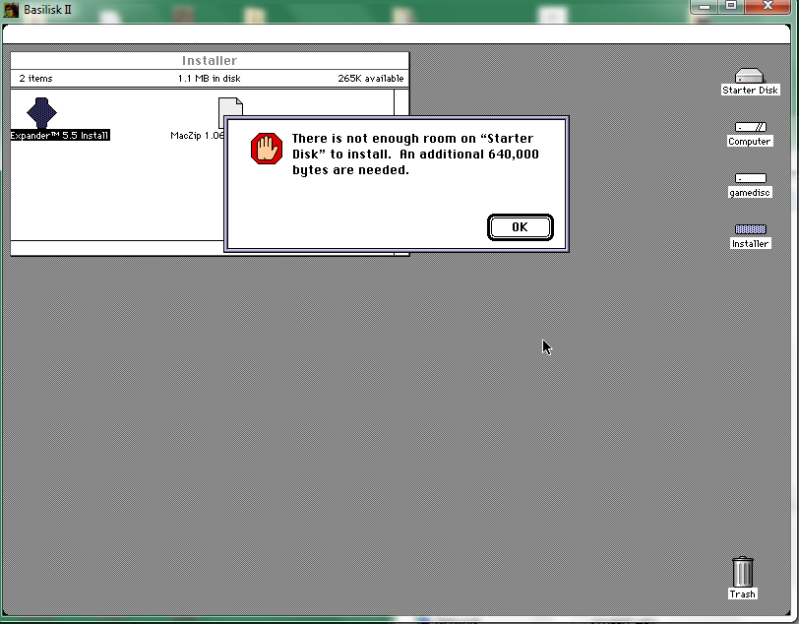
I pretty much have no idea what I'm doing here; I've just been relying on the guides, and I can't find any reference as to how to deal with this anywhere. Can anyone tell me how to get Stuffit and some games running?

Comments

Offline
Watcher
Joined: 2009 Apr 10

The hard disk image you are trying to install Stuffit onto doesn't have any free space. Use the Basilisk II GUI to create a new hard disk image and add it to the list of installed volumes. Do this is the "disk" tab of the GUI.

When Mac OS boots, you will have to follow the on-screen instructions to boot it up.

Judging by the name of the "starter disk" you are using, I have a sneaking suspicion you are using a Basilisk II setup guide that I wrote eleven (!) years ago. For reference, here's a more recent guide:

http://emaculation.com/doku.php/basilisk_142_setup

Offline
Joined: 2009 Dec 19

Saki-san e,

I use a tool by the name of HFVExplorer to create drive-files. Try looking for it in your favourite search engine. If you have no luck, send me a note and I'll e-mail it to you ar put it up on the site. It's a Windows app. If that is too much hassle, I could always just compress an empty drive file for you and send you that.

mata ne

Offline
Watcher
Joined: 2009 Apr 10

HFV Explorer isn't necessary for creating hard disk images. That can be done using the Basilisk II GUI.